Example
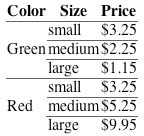
In the following example, the table is wrapped in an <alternatives> element together with a graphic showing the formatted table:
...

    <table-wrap>
      <alternatives>
	<table rules="rows">
	  <thead>
	    <tr>
	      <th>Color</th>
	      <th>Size</th>
	      <th>Price</th>
	    </tr>
	  </thead>

	  <tbody>
	    <tr>
	      <td rowspan="3">Green</td>
	      <td>small</td>
	      <td>$3.25</td>
	    </tr>
	    <tr>
	      <td>medium</td>
	      <td>$2.25</td>
	    </tr>

	    <tr>
	      <td>large</td>
	      <td>$1.15</td>
	    </tr>

	    <tr>
	      <td rowspan="3">Red</td>
	      <td>small</td>
	      <td>$3.25</td>
	    </tr>

	    <tr>
	      <td>medium</td>
	      <td>$5.25</td>
	    </tr>

	    <tr>
	      <td>large</td>
	      <td>$9.95</td>
	    </tr>
	  </tbody>
	</table>
	<graphic xlink:href="images/tablesample1">
	  <alt-text>A table with columns for color, size, and price.</alt-text>
	  <long-desc>The table has three columns, labeled "Color",
	    "Size", and "Price".
	    It has six rows; reading across, they are:
	    Green, small, $3.25,
	    Green, medium, $2.25,
	    Green, large, $1.15;
	    Red, small, $3.25,
	    Red, medium, $5.25,
	    Red, large, $9.95.
	    (Tbe words "Green" and "Red" occur only once each, in an area
	    three rows in height.)
	  </long-desc>
	</graphic>
      </alternatives>
    </table-wrap>

   ...
The graphic rendering of the table is: